

Quick Summary
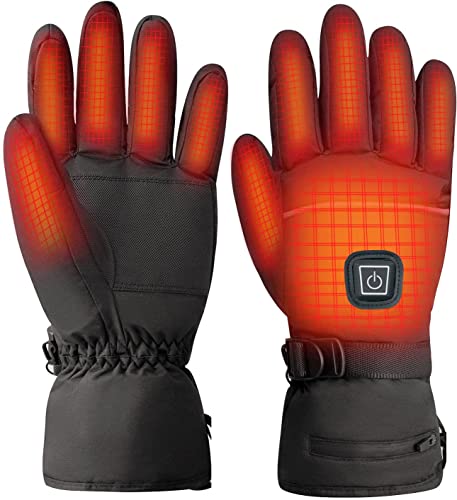
Lomffy USB heated gloves have heating pads on both sides of the hands and three temperature settings. The thumb and forefinger have screen-touch areas, and the gloves are powered through a 5V USB connection.
Key Details
| Detail | Product information and buyer relevance |
|---|---|
| Heating | Pads are positioned on the front and back of the hands. |
| Temperature settings | Three levels: high about 55°C, middle about 50°C and low about 45°C. |
| Power | USB 5V. The selected USB power source needs to provide 5V. |
| Screen-touch areas | Located on the thumb and forefinger. |
| Construction | Knitted full-finger gloves. |
What to Compare Before Buying
- Check that the USB power source provides 5V and that its position works with the gloves’ cable arrangement.
- Consider whether the three stated temperature levels and the thumb and forefinger touch areas match your preferences.
Setup and Correct Use
Put on the gloves, connect them to a USB port with a 5V power supply, switch on the power and adjust the temperature. Allow the heating pads to heat up. Unplug the power supply when the gloves are not in use.
Care, Cleaning and Storage
Remove the heating piece before washing the gloves, which can be washed separately. If a heating pad gets wet, dry it before use.
Before You Decide
Check the 5V USB power requirement, the approximate temperatures for each setting and whether the cable arrangement suits where you plan to use the gloves. Follow the stated drying and unplugging instructions.